
Search "portable gaming station" and almost everything that comes up is built around a console. PS5 cutouts, Xbox cutouts, monitor sizes tuned to console output. If you're a PC gamer, it's easy to assume this whole category just wasn't built for you.
That's not quite true — but the honest answer is that PC support in this space isn't a simple yes. It splits into two very different situations depending on what you actually own, and the engineering requirements are genuinely different from a console case. Here's how it actually breaks down.

POGA Max - PC Gaming Station
Purpose-built for PC gamers who want desktop-class performance in a portable format. POGA Max features active cooling with dedicated airflow zones, GPU integration, multi-display support, and engineering specifically designed for PC thermal demands.
- ✓ Active cooling system with dedicated fans
- ✓ GPU integration for desktop-class gaming
- ✓ Multi-display HDMI/USB-C support
- ✓ High-performance thermal management
Why PC Is a Harder Engineering Problem Than Console
A console is a fixed, known quantity — Sony and Microsoft control the exact thermal output and power draw, so a case manufacturer can engineer around one specific set of specs. A gaming PC is the opposite: variable components, variable power draw, and — critically — a lot more heat generated under load than a console produces.
This matters enormously for case design. Console-focused stations, including passively-cooled ones, can rely on well-placed ventilation slots alone because console thermal output is modest and predictable. A gaming PC packed into a similarly sized enclosure is a different thermal challenge entirely — small-form-factor PC builds are notorious for pushing serious heat into a confined space, which means a case has to actively manage airflow with real fans and dedicated intake/exhaust zones, not just passive vents. A console case's cooling approach, dropped onto PC components, simply wouldn't keep up.
Portable Gaming Stations for PC: Pros and Cons
Advantages
- ✓
Desktop-Class Performance
Real GPU and CPU power without laptop compromises
- ✓
Active Cooling
Dedicated fans handle sustained high-performance gaming
- ✓
Multi-Display Support
Extended display options for competitive advantages
- ✓
Flexible Setup
Portable desktop experience, not just laptop gaming
Challenges
- ✗
Requires Open Operation
Must stay open during use for proper airflow
- ✗
Higher Cost
Active cooling and GPU integration increase price
- ✗
Power Requirements
Need access to power outlet for sustained gaming
- ✗
Fewer Options
PC-focused cases are rarer than console models
Two Different PC Gaming Scenarios
Situation 1: You Already Own a Gaming Laptop
If your setup is a gaming laptop rather than a desktop tower, you don't actually need an all-in-one gaming station — your laptop already has its own screen, GPU, and cooling system built in. What you're really looking for here is protection and, optionally, a second display for a bigger-screen experience.
For this situation, a hard-shell laptop travel case with custom foam cutouts and shock protection covers the "protect the hardware" half of the problem well. If you want an external display for a larger, more immersive setup, that's really a separate portable monitor purchase — plenty of options exist in the 15–18 inch range with HDMI or USB-C input specifically built for this use case. Buying an all-in-one console-style station and trying to jam a laptop into it usually doesn't work well, since the interior is shaped around console dimensions, not laptop form factors.
Situation 2: You Want a True Portable Desktop-Class Setup
This is the more interesting case, and where a purpose-built product actually earns its price. Rather than carrying a laptop, some gamers want the full desktop-class experience — a real GPU, a real cooling system, a real display — packed into something that travels. This is a genuinely different product category from a console case wearing a "PC compatible" label, and POGA's PC-focused model, the POGA Max, is built specifically around this problem.
The POGA Max integrates an actual GPU inside the case itself, rather than just providing storage space for a laptop. It supports external monitors via HDMI or USB-C, and includes a dedicated HDMI output on the back panel specifically so you can run a dual-screen setup — turning the case into an extended, multi-monitor command center rather than a single fixed display. That's meaningfully more flexible than a console station, where the built-in monitor is generally the only screen in play.
Cooling: Where PC-Specific Engineering Shows
Rather than the passive, vent-only approach that works for consoles, the POGA Max uses an active cooling system with dedicated ventilation zones and strategically placed fans working together to pull in cool air and expel heat — necessary because PC components under sustained gaming load generate meaningfully more heat than a console does.
One important operational detail: the system is designed to run in its open position, meaning airflow depends on the case being open during use, not sealed shut the way you might picture a console running enclosed. The shell itself is built with reinforced corners and secure locking mechanisms, suited to travel by car or train, turning wherever you land into a functioning setup.
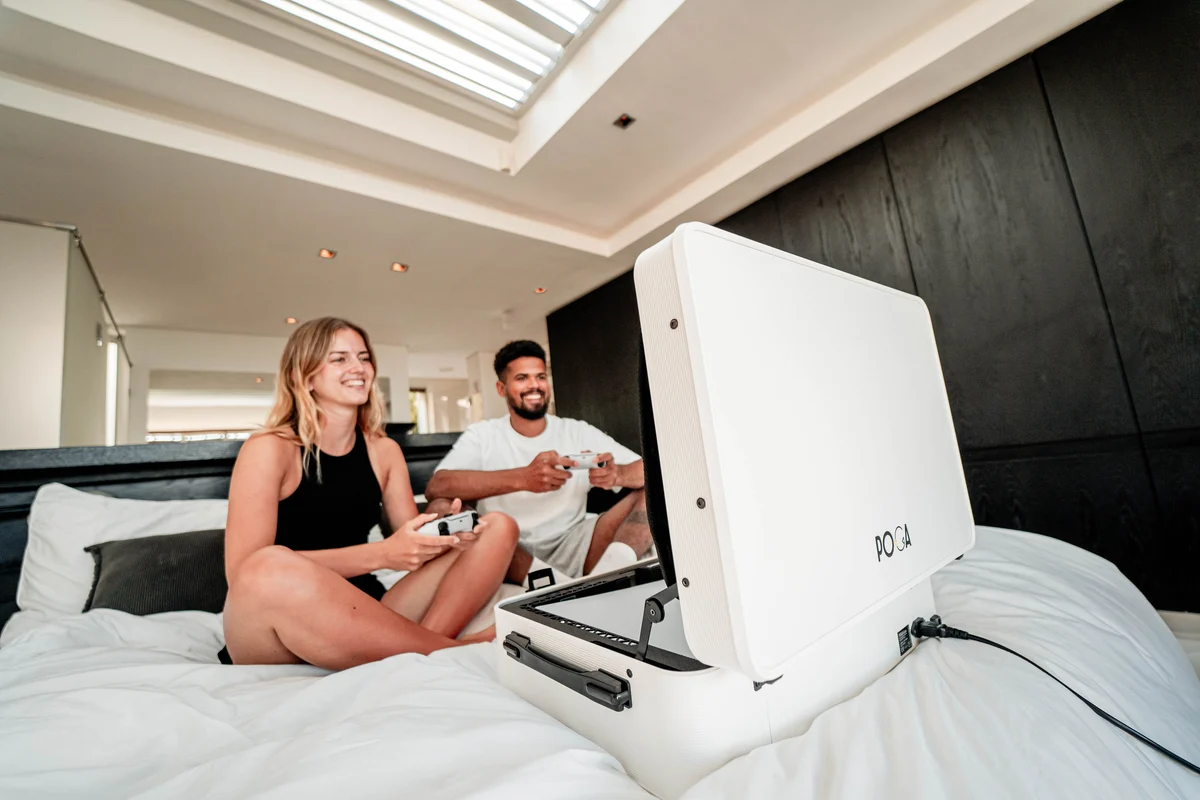
Gaming Anywhere, Anytime
POGA portable gaming stations transform any space into a complete gaming setup. Whether you're gaming at home, traveling, or setting up at a friend's place, experience desktop-class performance with the flexibility you need.
- ✓ Works in any room or location
- ✓ Durable transport case protection
- ✓ Professional cooling engineering
- ✓ Ready to game in minutes
PC Gaming Station vs. Console Gaming Station Comparison
| Feature | Console Station | PC Station (POGA Max) |
|---|---|---|
| Cooling Type | Passive venting | Active fans + dedicated zones |
| Operating Mode | Can be sealed during use | Requires open operation |
| Display Support | Built-in monitor only | Multi-display via HDMI/USB-C |
| GPU Integration | N/A (console provides) | Yes, built-in GPU |
| Component Variability | Fixed specs | Customizable components |
| Typical Use Case | Console-exclusive gamers | PC gamers wanting portability |
| Price Range | $300–$1,000 | $1,000–$2,000+ |
What to Actually Check Before Buying a PC-Focused Station
Is the cooling active or passive, and does that match your components?
A passive, vent-only design that works fine for a console is not adequate for real PC components under load. Look specifically for active cooling — dedicated fans and airflow zones — if you're running a genuine GPU and CPU inside the case.
Does it need to be open to operate?
Some designs, including active-cooling PC cases, are built to run with the case open rather than sealed. This isn't a flaw �� it's how the airflow path is designed to work — but it does change how you think about "portable" versus "enclosed and sealed" while playing.
Can it output to an external display, or only its own screen?
If you want flexibility — an extended multi-monitor setup, or the option to use a bigger screen when one's available — check for a dedicated HDMI or USB-C output beyond the built-in monitor, not just the primary display port.
Is it actually built around your component type, or adapted from a console case?
A case genuinely engineered for PC hardware will describe GPU integration, active cooling zones, and multi-display support specifically. A console case with a vague "also works with PC" mention in the fine print usually means "you can technically plug something in," not "this was engineered for your components."
Frequently Asked Questions
Can I use a console portable gaming station with my gaming PC?
Technically you can plug a PC into most portable gaming stations, but it's not ideal. Console cases are engineered around specific thermal and power profiles. A gaming PC — especially under load — generates more heat than a console, and most console-focused stations use passive cooling only, which isn't adequate for sustained PC gaming. For the best experience, you want a case designed specifically for PC components.
What's the difference between a portable gaming station for consoles vs. PCs?
Console cases are built around fixed, known hardware with modest, predictable thermal output. PC cases must handle variable components, higher power draw, and significantly more heat generation. PC-focused cases like the POGA Max use active cooling with dedicated fans and airflow zones, GPU integration, and often multi-display support — features not necessary for consoles.
Is POGA Max better for gaming laptops or desktop PCs?
POGA Max is designed for gamers who want true desktop-class performance in a portable format — meaning real GPU hardware, active cooling, and flexible display options. If you already own a gaming laptop, you don't need POGA Max; a protective travel case and a separate portable monitor would serve you better.
Do portable gaming stations for PC need to stay open while gaming?
Some do, including active-cooling PC cases. This isn't a flaw — it's how the airflow is engineered. The case is built to travel sealed and protected, but operates open during use to ensure proper thermal management. Check product specs to understand whether a specific model is designed to run open or closed.
Can I use a portable gaming station for both console and PC?
It depends on the case design. Most cases are optimized for one or the other, not both. A case with passive cooling and a fixed monitor layout works great for consoles but won't handle PC thermal demands. A PC-focused case with active cooling may accommodate console gaming, but the reverse isn't usually true.
What should I look for in a PC gaming portable station?
Look for active cooling (dedicated fans, not just passive vents), GPU integration if you want desktop-class power, multi-display support for flexibility, and clear thermal specifications. The case should explicitly state it's engineered for PC components, not just claim "PC compatible" as an afterthought.
Is a portable gaming station good for a gaming laptop?
A gaming laptop already has built-in screen, GPU, and cooling, so you don't need an all-in-one station. What helps is a protective hard-shell travel case and optionally a separate portable monitor (15–18 inch) for a larger screen experience. This is more flexible and often cheaper than buying a full station.
The Bottom Line
Yes, PC gamers absolutely have a place in this category — it's just not a one-size-fits-all answer the way it can seem to be for consoles. If you already own a gaming laptop, what you actually need is good protective storage and maybe a separate portable monitor, not an all-in-one station built around console dimensions.
If you want a true portable desktop-class experience — a real GPU, real cooling, real dual-screen flexibility — that's a genuinely different engineering job, and it's worth choosing a case, like the POGA Max, that was actually built around PC thermal demands rather than one that just claims PC compatibility as an afterthought.